Build Your Own Workspace

Your team. Your tools. Your workspace.

Choose your departments, arrange your tools, and make IronBelle fit the way your team works.

Included with every plan.

Explore Your Options

Here are the choices available after signup. Company owners configure the workspace from their dashboard.

Start with a layout

  • Field crews

    Job Safety Analysis · Digital Forms & Permits · Chemicals & SDS · Training · Toolbox Talks

  • Safety management

    Daily Tasks · Incident Reporting · Training · Document Library · Compliance Updates

  • Office & records

    Document Library · Training · Daily Tasks · OSHA Inspection Support

Make it fit your team

  • Choose department shortcuts and use the quick-navigation dropdown.
  • Select and arrange dashboard tools in the order you prefer.
  • Review JSA preparation and approval settings separately.
  • Preview owner, manager, and employee views before confirming and saving.
See all available tool shortcuts
  • Daily Tasks
  • Document Library
  • Job Safety Analysis
  • Digital Forms & Permits
  • Chemicals & SDS
  • Training
  • Toolbox Talks
  • Incident Reporting
  • OSHA Inspection Support
  • Compliance Updates

This is a display of available options. Tools follow each person’s existing role. Department shortcuts open shared company records; they do not separate records by department.

Your AI Safety Director

Your Safety
Expertise.
Backed by AI.

Powered by AI. Guided by people.

Turn your team’s actual work into safety-program drafts, job safety analyses, toolbox talks, and a clear list of next steps.

Start Free Trial

IronBelle on your home screen

Open your existing workspace from an app icon. Use the same account and saved records.

iPhone or iPad: Open IronBelle in Safari, tap Share, then Add to Home Screen. Turn on Open as Web App if shown, then tap Add.

Android: Open IronBelle in Chrome, tap the browser menu, then Install app or Add to Home screen.

Computer: Use the install icon in Chrome or Edge’s address bar, or Safari’s File → Add to Dock.

An internet connection is required to load records, save forms, and submit signatures.

Install from this website on iPhone or Android. No App Store needed.

Review, approve, and track everything in one place. Your experience, judgment, and leadership stay at the heart of workplace safety.

IronBelle today: from onboarding to the worksite

Press Play with sound to hear the complete IronBelle Narrator tour.

Preview an example workspace
IronBelle / Your workspace

Example workspace · Fictional company

AI Safety Director

Your safety work, connected.
Let’s keep your team moving forward.

Company-specific safety programsReview drafts
Job safety analyses & crew signaturesPrepare & sign
Training & corrective actionsAssign & track

Your work → AI support → Your review → Your team in action

One connected workspace, built around your team.

Guided onboardingCompany-specific draftsHuman confirmationOrganized records

Explore the real product

See what your team can do.

Select a tool to explore an example. No signup needed to look.

Real product screens · Fictional demonstration

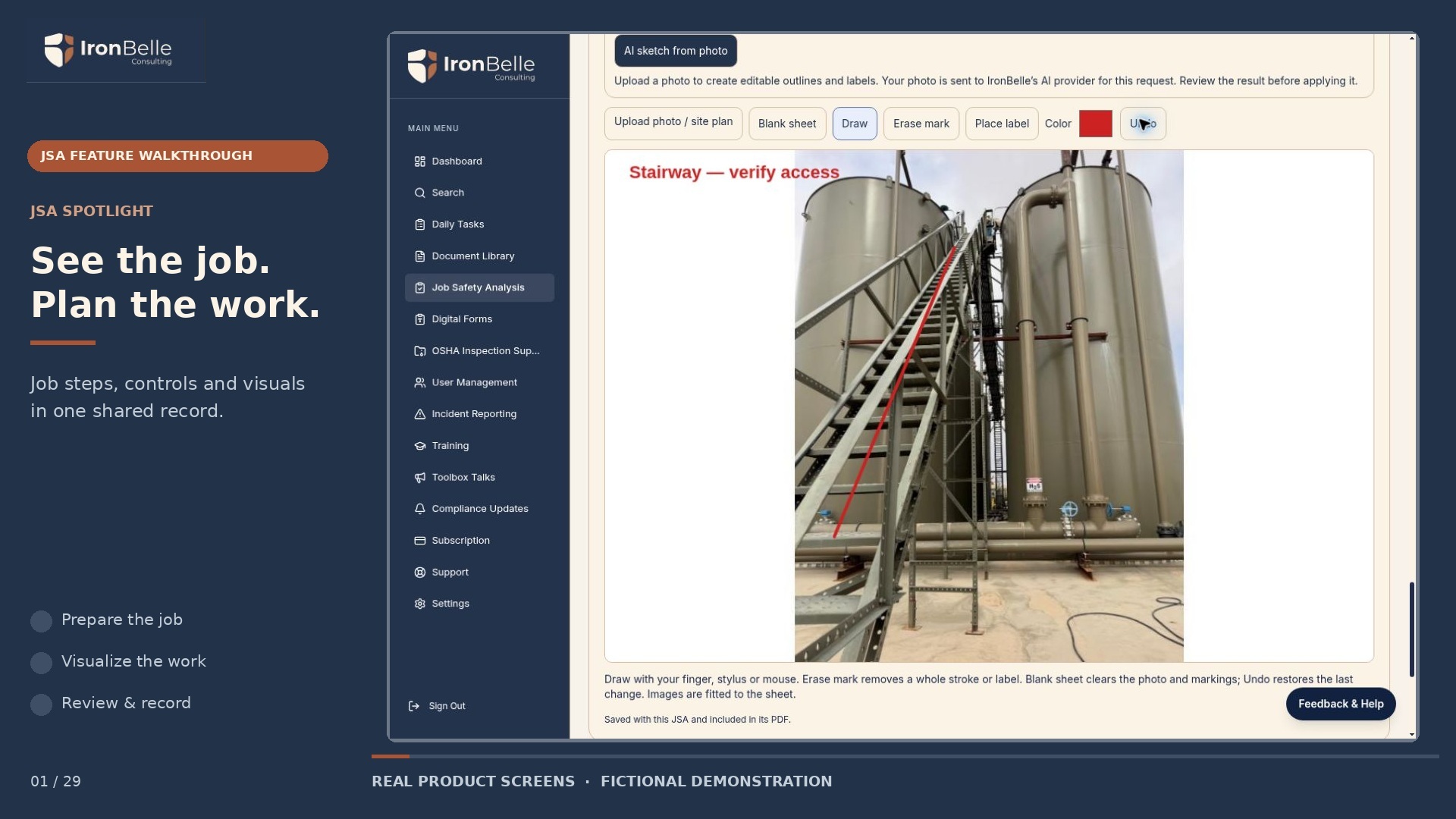
Make the job easier to discuss.

Connect job steps, hazards, controls and a safety sketch so your crew has a shared starting point for review.

  • Job steps and controls
  • Worksite photos and sketches
  • Crew review and QR signatures
Open full-size example
JSA & safety sketches — recorded product example

Try the sketch tools yourself.

Draw on a blank sheet. No account needed.

Nothing is uploaded or saved. Closing, switching tools or refreshing discards your drawing.

One connected safety workspace

Your team. Your work.
Everything has its place.

Explore the tools around the people who use them. Every plan includes the full IronBelle platform.

Prepare the work, review the conditions and bring the crew into the record.

Prepare the job before your crew gets to work.

  • Voice and photo together to prepare a reviewed job description
  • Job steps, hazards, consequences, and controls
  • Initial and residual risk ratings
  • PPE details and emergency / rescue planning
  • Worksite coordinates, photos, and safety sketches

Keep every open permit visible until your team closes it, with status, dates, and history in one place.

  • Permits stay on your open list until closed
  • See active, suspended, expired, and closed status
  • Link reviewed company permit forms and related JSAs
  • Record issuance, suspension, and closeout history
  • Track linked corrective actions, responsible people, and due dates

More support where the work happens.

  • AI photo-assisted review of possible visible hazards
  • Evidence and questions for onsite verification
  • Prepare a JSA on your device before losing service
  • Record voice and attach photos offline; process with AI after reconnecting
  • Edit offline, then reconnect, recover, review, and save

Bring every crew member into the review.

  • QR code for crew review and signing on their phones
  • Individual JSA acknowledgements and signatures
  • Download each worker’s signed JSA copy
  • Optional email of that signed copy

Keep your chemical inventory and manufacturer safety data sheets together.

  • Search chemicals by product name
  • Record manufacturers and storage / work locations
  • Upload and download manufacturer SDS PDFs
  • Track missing SDSs, revision dates, and earlier versions

Bring your existing paperwork into IronBelle.

  • Upload your company’s PDF or photographed forms
  • Review the extracted fields
  • Complete, sign and submit forms
  • Download the completed PDF for your records

Start with your company. Build the workspace around your team.

Start Free Trial
How it works

A clear path from setup to the worksite.
From your work to your workspace.

Your answers guide the drafts. Your review and real-world follow-through make them useful.

1
Company setup

Tell Us About Your Operation

Add your industry, locations, workforce, and work activities. Describe what your own employees do, including their role at client sites.

IndustryLocationsActual work
2
Confirm your profile

Review Suggestions and Answer Questions

Confirm or remove suggested hazards. Answer industry-specific questions about exposures, permits, and responsibilities. An AI suggestion is a starting point for your review.

Hazard reviewService rolesDeciding questions
3
Prepare your system

Get Drafts and a Clear Work List

IronBelle prepares documents and forms using your confirmed profile. Your dashboard separates confirmed requirements, items needing verification, and recommended practices.

Program draftsDigital formsTraining topics
4
Put it into practice

Review, Assign, Complete, and Track

Approve documents after checking them against your operation. Assign training, complete inspections, collect signatures, and close corrective actions. Your team carries out the work and records the results.

ApprovalsTraining recordsCrew signatures
Pricing

Pricing That Fits Your Workforce.

Every plan includes the full IronBelle platform. Choose your plan based on your employee count.

1–50 Employees

$199/mo

Billed monthly

Full platform access for your team.

Get Started

51–200 Employees

$399/mo

Billed monthly

Full platform access for your growing workforce.

Get Started

201–400 Employees

$999/mo

Billed monthly

Full platform access across your organization.

Get Started

401+ Employees

Custom

Tailored to your workforce

Pricing tailored to your workforce size.

Request Custom Plan

Included with every plan: Documents & digital forms · AI-assisted program drafts · Training & toolbox talks · Incident reporting · Company dashboard

14-day free trial · No credit card required · Cancel any time

THE IRONBELLE AFFILIATE PROGRAM

Good connections.
More possibilities.

Know a business that could use IronBelle? Introduce them to tools that help organize safety work—and earn on qualifying paid subscriptions.

10%

Default commission rate

On eligible paid subscription invoices, including renewals.

Meet the affiliate program

Become an IronBelle affiliate

Press Play with sound to hear the complete IronBelle Narrator tour.

You bring the connection. We give you the tools.

Start Here guidance, a complete marketing kit and a dashboard to follow your referrals—all in your affiliate workspace.

Your link. Your referrals.

Share your personal referral link with businesses in your network.

A kit that gets you started.

Emails, social posts, branded graphics, video scripts, a customer handout and a seven-day launch plan.

See how it’s going.

Follow referrals, earnings and pending payouts from your affiliate dashboard.

Keep payouts in view.

Connect an eligible Stripe account and review your payout history and status.

A clear place to start.

  1. 01

    Join the program

    Create your affiliate account and review the agreement.

  2. 02

    Make it personal

    Use the Start Here guide, choose your materials and share your exact referral link with a clear disclosure.

  3. 03

    Follow your progress

    Track qualifying paid subscriptions and renewals. IronBelle reviews and processes eligible payouts.

Your assigned rate and the affiliate agreement govern commissions. Eligible amounts are calculated after discounts and exclude tax. Free trials and unpaid invoices do not earn commission. Payouts require eligible Stripe setup and IronBelle review. Read the affiliate agreement

Your Workers Deserve a Safer
Workplace. Start Today.

Start with your company profile. Prepare drafts, review the requirements behind them, and give your team a clear place to manage safety work.

14-day free trial · No credit card required · Cancel any time

IronBelle prepares drafts and tracks implementation. Your team must verify applicability, review documents, deliver training, and carry out required safety practices. Software and generated documents do not establish OSHA compliance.